Задача дать поддержке права для сброса сессии с фермы терминалов RDS.
Сначала надо создать группу и поместить туда всех людей кто будет сбрасывать сессии и подключаться.
Назавём её Terminal Servers Administrators
Теперь делаем скрипт и добавляем в него наши хосты фермы и группу которую сделали
$Group = "domen\Terminal Servers Administrators"
$Servers = @(
   "Host-RDSH1",
"Host-RDSH2",
"Host-RDSH3",
"Host-RDSH4",
"Host-RDSH5"
)
ForEach ($Server in $Servers) {
    #Делегируем право на теневые сессии
    $WMIHandles = Get-WmiObject `
        -Class "Win32_TSPermissionsSetting" `
        -Namespace "root\CIMV2\terminalservices" `
        -ComputerName $Server `
        -Authentication PacketPrivacy `
        -Impersonation Impersonate
    ForEach($WMIHandle in $WMIHandles)
    {
        If ($WMIHandle.TerminalName -eq "RDP-Tcp")
        {
        $retVal = $WMIHandle.AddAccount($Group, 2)
        $opstatus = "успешно"
        If ($retVal.ReturnValue -ne 0) {
            $opstatus = "ошибка"
        }
        Write-Host ("Делегирование прав на теневое подключение группе " +
            $Group + " на сервере " + $Server + ": " + $opstatus + "`r`n")
        }
    }
}
Теперь делаем скрипт на Powershell с помощью которого будет производиться поиск сессии на терминальной ферме и потом будет выбор убить сессию или подключиться
$Servers = @(
    "Host-RDSH1",
"Host-RDSH2",
"Host-RDSH3",
"Host-RDSH4",
"Host-RDSH5"
)

function Invoke-RDPSessionLogoff {
    Param(
        [parameter(Mandatory=$True, Position=0)][String]$ComputerName,
        [parameter(Mandatory=$true, Position=1)][String]$SessionID
    )
    $ErrorActionPreference = "Stop"
    logoff $SessionID /server:$ComputerName /v 2>&1
}

function Invoke-RDPShadowSession {
    Param(
        [parameter(Mandatory=$True, Position=0)][String]$ComputerName,
        [parameter(Mandatory=$true, Position=1)][String]$SessionID
    )
    $ErrorActionPreference = "Stop"
    mstsc /shadow:$SessionID /v:$ComputerName /control 2>&1
}

Function Get-LoggedOnUser {
    Param(
        [parameter(Mandatory=$True, Position=0)][String]$ComputerName="localhost"
    )
    $ErrorActionPreference = "Stop"
    Test-Connection $ComputerName -Count 1 | Out-Null
    quser /server:$ComputerName 2>&1 | Select-Object -Skip 1 | ForEach-Object {
        $CurrentLine = $_.Trim() -Replace "\s+"," " -Split "\s"
        $HashProps = @{
            UserName = $CurrentLine[0]
            ComputerName = $ComputerName
        }
        If ($CurrentLine[2] -eq "Disc") {
            $HashProps.SessionName = $null
            $HashProps.Id = $CurrentLine[1]
            $HashProps.State = $CurrentLine[2]
            $HashProps.IdleTime = $CurrentLine[3]
            $HashProps.LogonTime = $CurrentLine[4..6] -join " "
            $HashProps.LogonTime = $CurrentLine[4..($CurrentLine.GetUpperBound(0))] -join " "
        }
        else {
            $HashProps.SessionName = $CurrentLine[1]
            $HashProps.Id = $CurrentLine[2]
            $HashProps.State = $CurrentLine[3]
            $HashProps.IdleTime = $CurrentLine[4]
            $HashProps.LogonTime = $CurrentLine[5..($CurrentLine.GetUpperBound(0))] -join " "
        }
        New-Object -TypeName PSCustomObject -Property $HashProps |
        Select-Object -Property UserName, ComputerName, SessionName, Id, State, IdleTime, LogonTime
    }
}
$UserLogin
$UserLogin=123
while ($UserLogin){
$UserLogin = Read-Host -Prompt "Vvedite login pol'zovatelya"
Write-Host "Poisk RDP-sessij pol'zovatelya na serverah..."
$SessionList = @()
ForEach ($Server in $Servers) {
    $TargetSession = $null
    Write-Host "  Opros servera $Server"
    Try {
        $TargetSession = Get-LoggedOnUser -ComputerName $Server | Where-Object {$_.UserName -eq $UserLogin}
    }
    Catch {
        Write-Host "Oshibka: " $Error[0].Exception.Message -ForegroundColor Red
        Continue
    }
    If ($TargetSession) {
        Write-Host "   Najdena sessiya s ID $($TargetSession.ID) na servere $Server" -ForegroundColor Yellow
        Write-Host "    CHto budem delat'?"
        Write-Host "      1 - podklyuchit'sya k sessii"
        Write-Host "      2 - zavershit' sessiyu"
        Write-Host "      3 - drygoi polzovatel"
        Write-Host "      0 - exit"
        $Action = Read-Host -Prompt "Vvedite dejstvie"
        If ($Action -eq "1") {
            Invoke-RDPShadowSession -ComputerName $Server -SessionID $TargetSession.ID
        }
        ElseIf ($Action -eq "2") {
            Invoke-RDPSessionLogoff -ComputerName $Server -SessionID $TargetSession.ID}


        ElseIf ($Action -eq "3") {break}

          ElseIf ($Action -eq "0") {exit}

        }

    Else {
        Write-Host "    sessij ne najdeno"
        }
}
}
После этого я Powershell скрипт завернул exe с помощью PS2EXE-GUI.
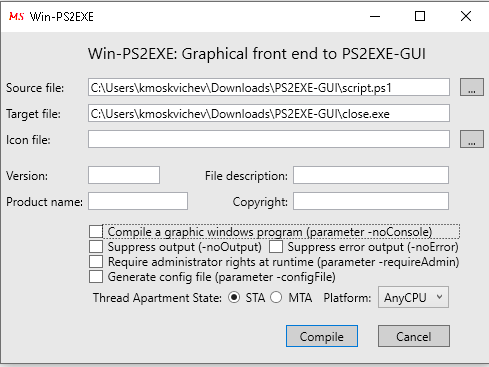
что бы не морочиться с правами на выполнение powershell
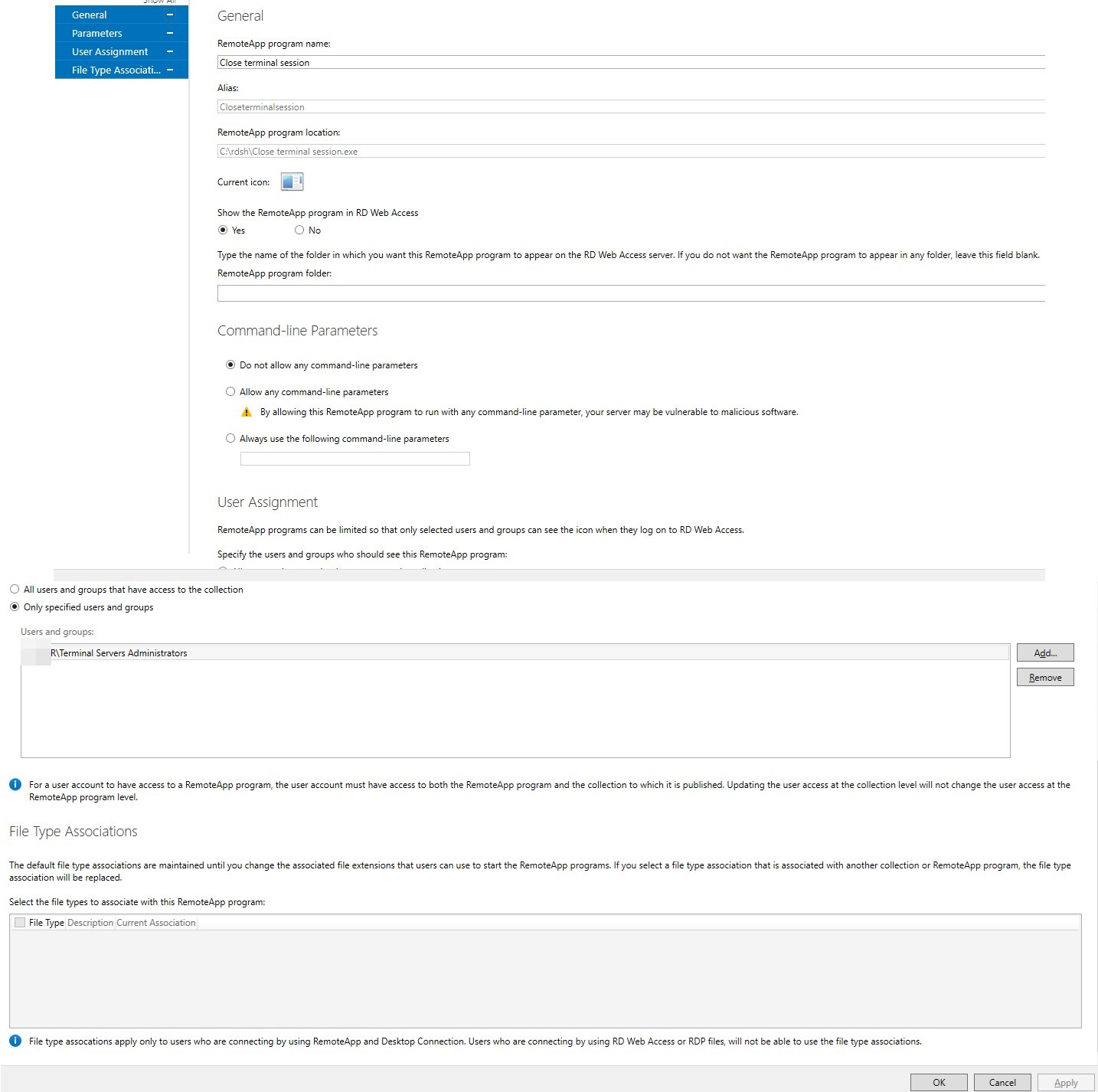
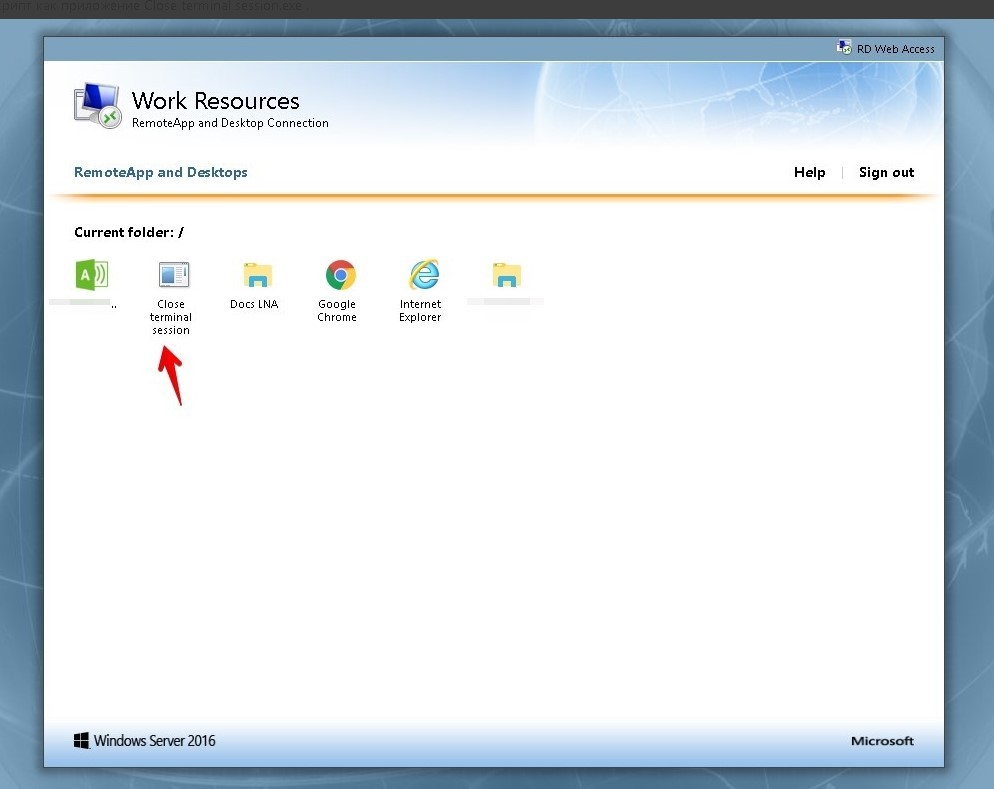
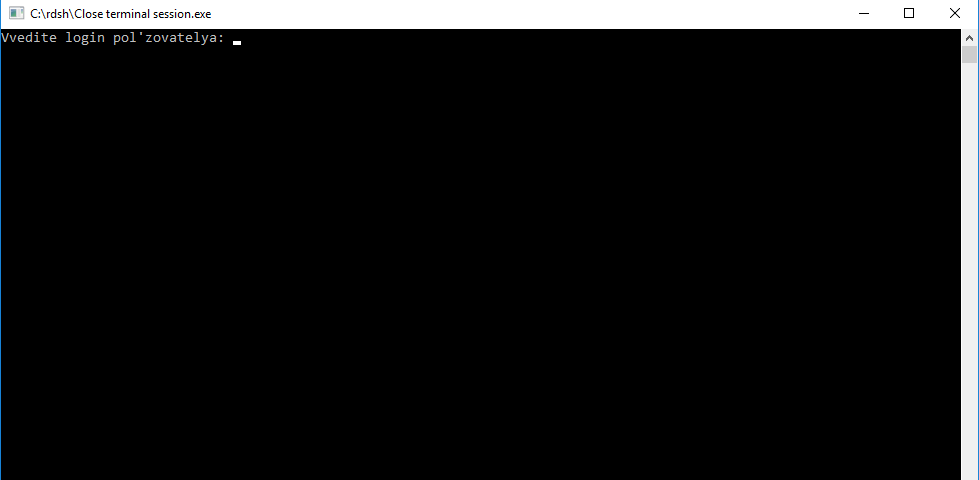
И опубликовал в remoteapp и дал права только на группу Terminal Servers Administrators
Немножко обновлённый скрипт:
[Console]::OutputEncoding = [System.Text.Encoding]::GetEncoding("utf-8")

function Invoke-RDPSessionLogoff {
    Param(
        [parameter(Mandatory=$True, Position=0)][String]$ComputerName,
        [parameter(Mandatory=$true, Position=1)][String]$SessionID
    )
    $ErrorActionPreference = "Stop"
    logoff $SessionID /server:$ComputerName /v 2>&1
}

function Invoke-RDPShadowSession {
    Param(
        [parameter(Mandatory=$True, Position=0)][String]$ComputerName,
        [parameter(Mandatory=$true, Position=1)][String]$SessionID
    )
    $ErrorActionPreference = "Stop"
    mstsc /shadow:$SessionID /v:$ComputerName /control 2>&1
}

Function Get-LoggedOnUser {
    Param(
        [parameter(Mandatory=$True, Position=0)][String]$ComputerName="localhost"
    )
    $ErrorActionPreference = "Stop"
    Test-Connection $ComputerName -Count 1 | Out-Null
    quser /server:$ComputerName 2>&1 | Select-Object -Skip 1 | ForEach-Object {
        $CurrentLine = $_.Trim() -Replace "\s+"," " -Split "\s"
        $HashProps = @{
            UserName = $CurrentLine[0]
            ComputerName = $ComputerName
        }
        If ($CurrentLine[2] -eq "Disc") {
            $HashProps.SessionName = $null
            $HashProps.Id = $CurrentLine[1]
            $HashProps.State = $CurrentLine[2]
            $HashProps.IdleTime = $CurrentLine[3]
            $HashProps.LogonTime = $CurrentLine[4..6] -join " "
            $HashProps.LogonTime = $CurrentLine[4..($CurrentLine.GetUpperBound(0))] -join " "
        }
        else {
            $HashProps.SessionName = $CurrentLine[1]
            $HashProps.Id = $CurrentLine[2]
            $HashProps.State = $CurrentLine[3]
            $HashProps.IdleTime = $CurrentLine[4]
            $HashProps.LogonTime = $CurrentLine[5..($CurrentLine.GetUpperBound(0))] -join " "
        }
        New-Object -TypeName PSCustomObject -Property $HashProps |
        Select-Object -Property UserName, ComputerName, SessionName, Id, State, IdleTime, LogonTime
    }
}

$Servers = Get-Content -Path "servers.txt" -Encoding "UTF8"

While ($true) {
    $UserLogin = Read-Host -Prompt "Введите логин пользователя"
    Write-Host "Поиск RDP-сессий пользователя на серверах..."
    $SessionList = @()
    ForEach ($Server in $Servers) {
        $TargetSession = $null
        Write-Host "  Опрос сервера $Server"
        Try {
            $TargetSession = Get-LoggedOnUser -ComputerName $Server | Where-Object {$_.UserName -eq $UserLogin}
        }
        Catch {
            Write-Host "Ошибка: " $Error[0].Exception.Message -ForegroundColor Red
            Continue
        }
        If ($TargetSession) {
            Write-Host "    Найдена сессия с ID $($TargetSession.ID) на сервере $Server" -ForegroundColor Yellow
            Write-Host "    Что будем делать?"
            Write-Host "      1 - подключиться к сессии"
            Write-Host "      2 - завершить сессию"
            Write-Host "      0 - ничего"
            $Action = Read-Host -Prompt "Введите действие"
            If ($Action -eq "1") {
                Invoke-RDPShadowSession -ComputerName $Server -SessionID $TargetSession.ID
            }
            ElseIf ($Action -eq "2") {
                $toLog = @()
                $logItem = [ordered]@{
                    Login = $UserLogin
                    Server = $Server
                    ExitType = "Kick"
                    Timestamp = Get-Date -Format "yyyy-MM-dd-hh-mm-ss"
                }
                $toLog += New-Object PSObject -Property $logItem
                $toLog | Export-CSV -Path "C:\rdsh\log.csv" -Encoding "UTF8" -Force -NoTypeInformation -Append
                Invoke-RDPSessionLogoff -ComputerName $Server -SessionID $TargetSession.ID
            }
            Break
        }
        Else {
            Write-Host "    сессий не найдено"
        }
    }
}
Similar Posts:
- Как делегировать права управления терминальных сессий не давая полные права на сервер в windows 2012/16
- Как завершить сессию на всех серверах в локальной сети.
- Как отключить (отмонтировать) диск User Profile Disks в RDS Windows Server
- Как сбросить все зависшие или в состоянии disconnect сессии в rpd rds ferma со всех хостов разом.
- Как удалить из папки файлы с серверов ad им перезапустить службу.